Klaket Editor · Free video editor

A complete free video editor that runs in your browser.

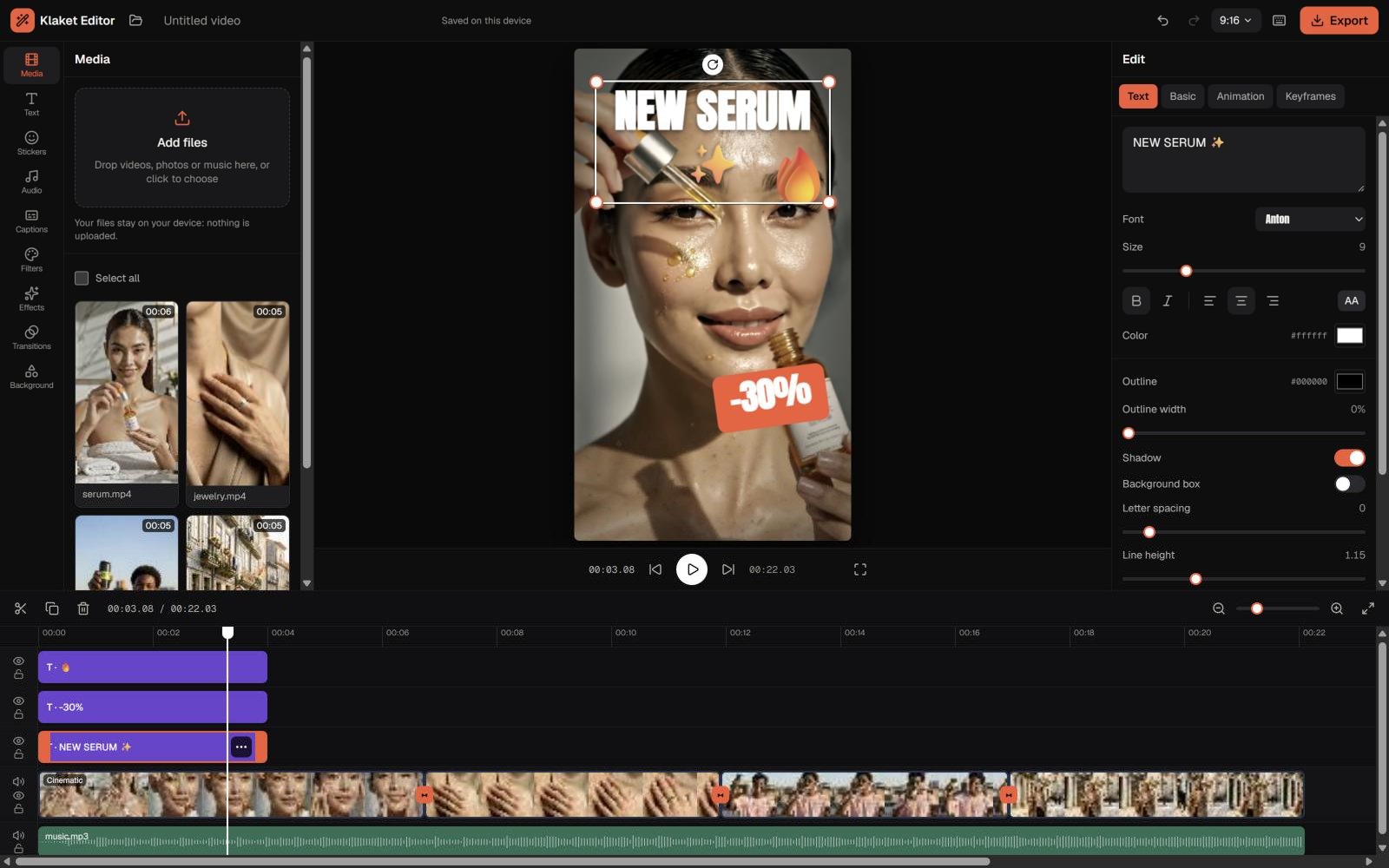
Klaket Editor has the tools of a paid editor and costs nothing: a multi-track timeline, text, music, captions, filters, transitions, effects and green screen. Export in up to 1080p with no watermark, no account and nothing to install. Your files never leave your device.

Opens instantly in your browser. No account, no download.

  • 100% free
  • Auto captions
  • No watermark
  • No sign-up
  • Green screen
  • 1080p free
  • Files stay on your device
Klaket Editor — Free video editor

Why Klaket Editor

How to do it

  1. 1. Add your files

    Drag videos, photos and music into the editor, or click to choose them.

  2. 2. Edit on the timeline

    Cut, reorder, add text, music, filters and transitions. Right-click any clip for more options.

  3. 3. Export MP4

    Choose the quality (up to 1080p free) and download your video with no watermark.

A free editor with everything you need

Most free editors either stamp a watermark, cap the export at 720p or ask you to sign up before you can download. Klaket Editor does none of that. You get a real multi-track timeline, 45 fonts with animations, 100+ stickers, 58 filters, 32 transitions, speed control from 0.1× to 8×, reverse, freeze frame, keyframes and green screen, and you export an MP4 in up to 1080p for free.

Made for social video

Pick 9:16 for TikTok, Instagram Reels and YouTube Shorts, 16:9 for YouTube, or 1:1 and 4:5 for feed posts. Clips that don't fit get a blurred or coloured background instead of black bars, so you never have to crop the important part.

Why is it free?

Klaket Editor is part of Klaket, an AI platform for video. The editor is free so anyone can edit videos without paying; Klaket earns from its AI tools and from optional 2K and 4K exports, which are one-time purchases, never a subscription.

Everything in Klaket Editor

Klaket: the all-in-one AI platform

Klaket Editor is the free part of Klaket, an AI platform that puts everything a business or creator needs for video in one place.

Frequently asked questions

Is Klaket Editor really free?

Yes. Editing and exporting in 360p, 480p, 720p and 1080p is free, with no watermark, no account and no trial period. The only paid extras are 2K export ($5.99) and 4K export ($9.99, includes 2K), each a one-time purchase that stays on your account forever. No subscription.

Does Klaket Editor add a watermark?

No. Videos exported from Klaket Editor have no watermark and no end card, at any resolution.

Are my videos uploaded anywhere?

No. Klaket Editor runs entirely in your browser: your files are read and exported on your own device and are never uploaded to a server. Projects are saved in your browser so you can close the tab and continue later.

Do I need to install anything?

No. It opens in the browser on Windows, Mac, Linux, Chromebook, Android and iPhone. Use an up-to-date Chrome, Edge or Safari.

What can I export?

MP4 video at 30 frames per second in 360p, 480p, 720p or 1080p for free, in any format (9:16, 16:9, 1:1, 4:5, 4:3, 3:4, 21:9). 2K and 4K exports are optional one-time purchases ($5.99 and $9.99).

What is Klaket?

Klaket is an all-in-one AI platform for businesses and creators. Besides the free Klaket Editor, it makes AI videos with the leading models (Kling, Seedance, Grok Imagine, Wan, PixVerse), swaps the person, object, outfit or background in your own videos, makes AI influencers and talking avatars, AI images, social media posts, landing pages, AI music (Klaket Music) and done-for-you video ads for brands (Klaket Studio).

Another question? Email klaket.support@gmail.com

Lights, camera, product.

Your next campaign starts with one photo.

Create account

Videos, posts and landing pages in one place. Creating your account is free; to generate, choose a credit pack from $7 or a plan.